Welcome to
Video, like most things on this site, is something I have always been interested in. Ever since I was a small child I've loved the idea of using a camcorder based on videotape to record videos and then edit them together in fun and interesting ways. I finally got my hands on a VHS-C camcorder, the JVC GR-AX900U. That camcorder has served me well despite the battery charger dying (or the batteries finally giving up) and I used it for quite a while when I had something fun I wanted to try.
The next camcorder that I obtained was a Sony DCR-TRV22. It's a MiniDV camcorder that was one of the more advanced models at the time. Sadly it died a couple months after I bought it, but it was the camcorder that really made me want to start a YouTube channel and, save a few videos from mid to late 2019, all videos on my channel that required filming have been made using MiniDV or Digital8 camcorders.
My next acquisitions were a Sony DCR-TRV9 MiniDV camcorder and a Sony DCR-TRV140 Digital8 camcorder. After my TRV22 died, I began using the TRV9 as my main YouTubing camcorder and have recently switched to the TRV140 as I have run out of MiniDV tapes. I expect to need to move on to my JVC at some point, given that I have only one Digital8 tape. I was also recently given a Samsung Hi8 camcorder, but I haven't gotten a chance to study it and the videotape is stuck inside.
Software-wise, I generally use various versions of iMovie (iMovie 2, iMovie '04, and iMovie HD generally), although I have access to old versions of Adobe Premiere and Final Cut Express as well.
Video Editors by System:
I also make anime music videos (AMVs) using iMovie on a much more modern MacBook that is property of our family. I enjoy making them because I enjoy anime (just look at the desktop backgrounds I have ;-)) and I love music, so it's a perfect match.
Update: I no longer use that MacBook and am currently working out a new way to make AMVs on AriPad.
Update 2: I now use Kdenlive to edit AMVs on AriPad, Premiere Pro also works but I prefer Kdenlive simply because I am guaranteed to always have access to it and therefore it is more ideal for the long-term.
I'll post pictures of my equipment and screenshots of the various non-linear editing software soon.
View links to my YouTube channels here.
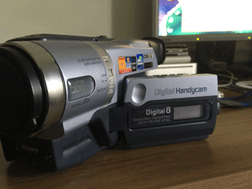
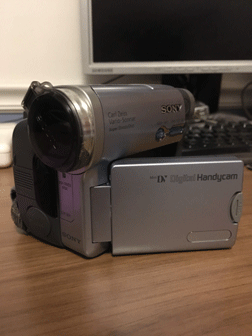
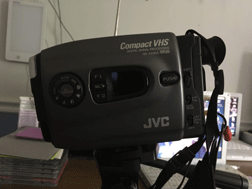
My Sony DCR-TRV140, DCR-TRV22, and JVC GR-AX900U